
Mealime announced October 21, 2026 as its shutdown date. Its published recipes and planning tools are continuing through Meals Hub inside Albertsons Companies grocery apps and websites. If you prefer an independent app with a familiar plan, shop and cook workflow, supperz is an alternative.
For a lot of people, Mealime is not just a recipe app. It is the thing that answers three connected questions every week: what are we eating, what do I need to buy, and how do I cook it?
That distinction matters when you start looking for a Mealime alternative. Plenty of apps store recipes. Plenty can make a grocery list. Fewer keep meal planning, shopping and cooking connected in one simple flow.
If you are already comparing options, our Mealime alternatives guide compares seven different replacement paths by the job each one does best.
Mealime announced that its standalone app would be discontinued on October 21, 2026, with its published recipes and planning tools continuing in Meals Hub. You can read the official Mealime shutdown notice directly.
What happened to Mealime?
Mealime announced its standalone app would end on October 21, 2026. The company was acquired by Albertsons Companies in 2021, and its published recipes and meal-planning tools continue through Meals Hub.
According to Mealime, Meals Hub is available through Albertsons Companies grocery apps and websites. It includes the Mealime recipe catalogue plus additional recipes, dietary preferences, meal-planning tools and grocery-shopping features.
As part of its shutdown announcement, Mealime said it would wind down paid subscriptions and stop further charges before the October 21 closure. This was a temporary transition arrangement, not a subscription that transfers to another app.
What happened to Mealime account data?
Mealime stated in its shutdown notice that personal account data would be deleted when the app closed. If you did not save a recipe backup before the shutdown, supperz cannot retrieve that information from your former Mealime account.
Mealime does not describe a one-click migration of your full Mealime account into an unrelated meal-planning app. Even when moving to Meals Hub, Mealime says certain preferences and settings need to be established directly in Meals Hub.
If you previously saved a compatible recipe ZIP or JSON backup, keep the original file and review it with the supperz importer. If you did not make a backup, you can still rebuild a new meal plan from scratch with supperz or use Meals Hub to browse published Mealime recipes.
Should you just move to Meals Hub?
For some Mealime users, yes. Meals Hub is the official path forward from Mealime, and it has one major advantage no independent replacement can claim: Mealime says its existing recipes will remain available there.
If keeping access to the exact Mealime recipe catalogue matters more than anything else, Meals Hub is the obvious place to start. Mealime also says you can use Meals Hub to browse recipes, build meal plans and generate shopping lists even if you do not have an Albertsons Companies store nearby.
But not everyone is looking for the official successor. You may prefer a dedicated meal-planning app that is independent of a grocery retailer, or you may care more about custom recipes, personal meal history, offline use or the particular workflow you were used to.
What should a Mealime replacement actually replace?
The easiest way to compare Mealime alternatives is to ignore the giant feature lists and look at the weekly jobs you need the app to do.
1. Help you decide what to cook
A useful meal planner should reduce decisions, not create more of them. That might mean recommending a weekly plan around your preferences, letting you browse and choose recipes quickly, or supporting both approaches.
2. Turn the plan into one grocery list
This is a big part of what made Mealime convenient. Once meals are selected, the ingredients should become a usable shopping list without making you copy items manually from every recipe.
3. Respect dietary preferences and ingredient dislikes
If you have already spent years teaching a meal-planning app what you eat, starting over is annoying. A replacement should make it easy to recreate diet, allergy and ingredient preferences and actually use them when suggesting meals.
4. Make recipes easy to cook
Recipe discovery is only half the job. Clear ingredients, serving sizes, nutrition information where available, and step-by-step instructions matter when the phone is actually beside the stove.
5. Let your own cooking become part of the system
Built-in recipes are useful, but most households also have meals they already love. Custom recipes, saved favourites, ratings and meal history make a planner more useful over time because it starts reflecting your own kitchen rather than only its catalogue.
| What you want to keep | A replacement should handle |
|---|---|
| Weekly meal planning | Manual planning plus useful recommendations |
| Automatic shopping | One grocery list generated from the meals you chose |
| Personalization | Diet, allergy and ingredient preferences |
| Easy cooking | Clear recipes, serving sizes and step-by-step instructions |
| Your own routine | Custom recipes, favourites, ratings and meal-plan history |
Where supperz fits
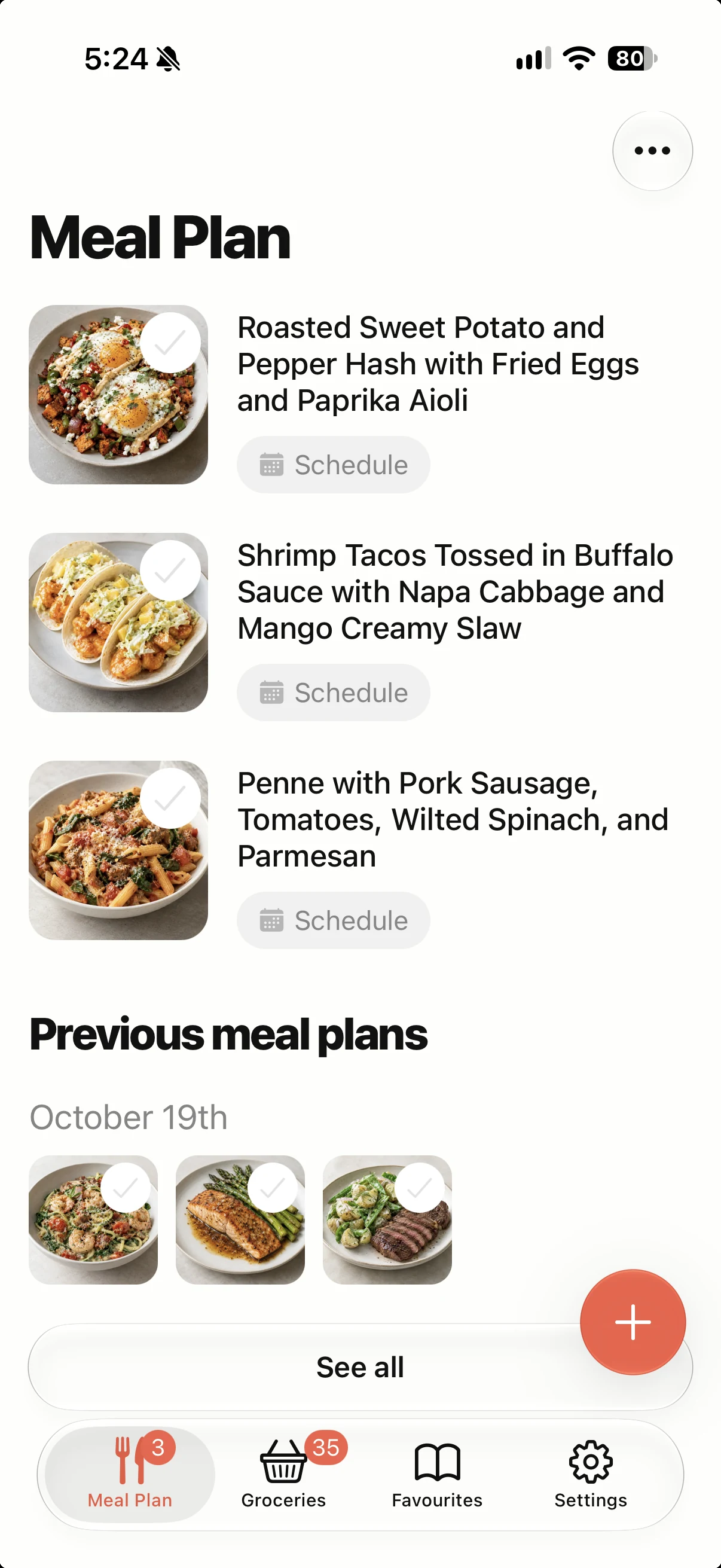
supperz is an independent meal-planning app built around a deliberately simple flow: plan, shop, cook.
You can browse recipes, build a meal plan yourself or generate one around your preferences. Recipes in the current plan feed into an organized grocery list automatically. When it is time to cook, the recipe stays connected to the same plan rather than becoming a separate experience.
The app also includes custom recipes, favourites, recipe ratings, nutrition information, dietary and allergy preferences, meal-plan history and offline-friendly access to key content.
supperz is designed for people who want planning, grocery lists and cooking to stay connected without turning meal planning into another hobby they have to manage.
supperz is not affiliated with Mealime or Albertsons Companies, and it is not a continuation of the Mealime service. That independence is intentional. The goal is to preserve the simplicity of the workflow while building a product that can keep evolving around the people using it.
For a detailed feature-by-feature look at the overlap and differences, see our supperz vs Mealime comparison.
Can you move saved Mealime recipes into supperz?
Only if you already have a compatible backup. The supperz Chrome and Edge Mealime exporter extensions have been withdrawn and no longer work. Our updated Mealime to supperz guide explains how to start fresh or import a previously saved ZIP or JSON file. You cannot retrieve new exports from the discontinued Mealime app.
- Find a saved recipe backup. Check whether you already have a compatible Mealime ZIP or JSON file from before the shutdown. No new Mealime export can be created with the retired extensions.
- Open the supperz import tool. Upload your existing compatible export and review the detected format. You do not need a browser extension.
- Review what was detected. Check favourites, custom recipes, photos and any import warnings before saving.
- Finish in supperz. Save the import to your supperz account and allow it to sync, or download the converted backup and import it in the app.
Not every saved recipe can be matched or transferred, and account preferences need to be set up again. The import page explains supported formats and limitations.
How to switch without making this a project
You do not need to rebuild years of habits in one sitting. A simpler transition is usually better:
- Identify the part of Mealime you actually rely on. For most people that is some combination of recipe discovery, weekly planning and the automatic grocery list.
- Use any backup you previously saved. If you have a compatible ZIP or JSON file, you can import it into supperz. Otherwise, create a new plan from the recipe library; old Mealime history and preferences cannot be restored automatically.
- Choose one replacement path. If the exact Mealime recipe catalogue is the priority, start with Meals Hub. If you want a separate independent app, try a dedicated alternative.
- Recreate only your important preferences first. Diet, allergies, dislikes and normal serving size are enough to get started.
- Build one week. The best test of a meal-planning app is whether you can plan a few dinners, shop from the resulting list and cook them without fighting the software.
If that first week feels easier, keep going. If it feels like you are doing more administration than cooking, try something else.
 supperz
Dinner, sorted.
Discover recipes you'll love, plan your meals, and get an automatic grocery list. All in one simple app.
Frequently asked questions
Mealime shutdown FAQ
Is Mealime shutting down?
Mealime announced that its standalone app would be discontinued on October 21, 2026. That date has passed, and former users are directed to Meals Hub.
When does Mealime shut down?
Mealime's announced shutdown date is October 21, 2026.
What replaces Mealime?
Mealime is directing users to Meals Hub, available through Albertsons Companies grocery apps and websites. You can also choose an independent meal-planning app if you prefer a separate product.
Will Mealime recipes still exist?
Mealime says all of its recipes will continue to be available in Meals Hub, along with additional recipes.
What happens to Mealime personal data?
Mealime says personal data will be deleted when the Mealime application shuts down.
Can I transfer my Mealime recipes and settings into supperz?
You can import supported saved Mealime recipe exports using the supperz recipe importer. This does not transfer your Mealime account or settings, and some favourites may not match. Set up dietary preferences and serving sizes again in supperz.
Is supperz affiliated with Mealime?
No. supperz is independent and is not affiliated with or endorsed by Mealime or Albertsons Companies.
Does supperz generate a grocery list from a meal plan?
Yes. Ingredients from recipes in your current meal plan are combined into an organized grocery list automatically.